
Perform a Vendor Review
Introduction
Evaluate the overall security of a Vendor Solution by assessing a set of Vendor Controls based on available documents and public records.
Step-by-Step Guide
Open a Vendor Solution’s details
Click on the ‘Start a Vendor Review’ button
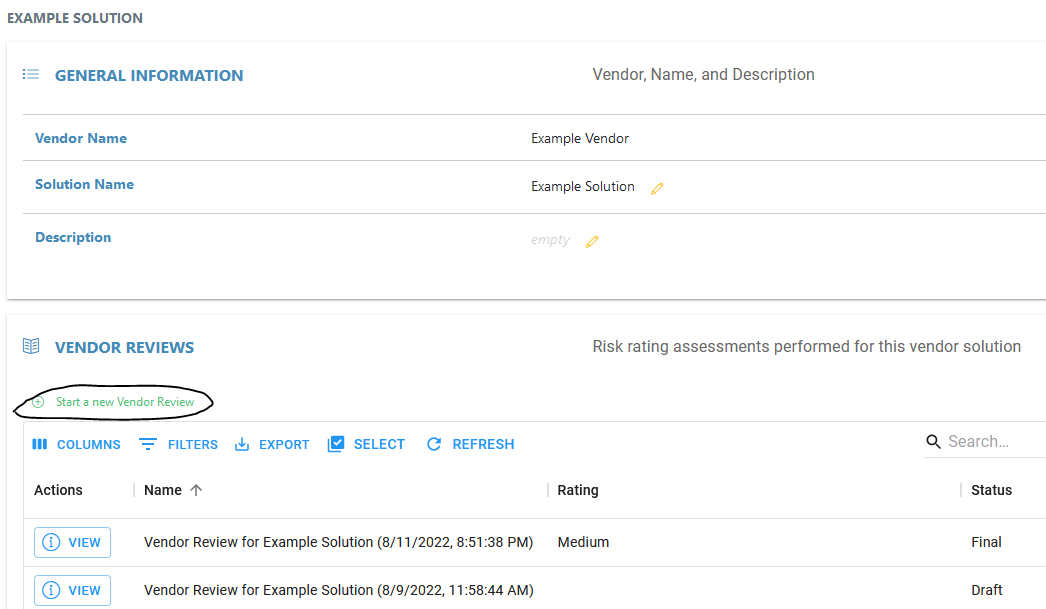
Wait for application to redirect you to the newly created Vendor Review
Optional: Upload Documents
Optional: Apply and upload Pre-Qualified Certifications
Evaluate the Vendor Controls
Set a Risk Rating based on the evaluated Controls
Generate a Summary and input the name of the reviewer
Optional: Generate a Full Report or a Controls Report
Video Tutorial
Related Articles
- Create a Vendor Control Category Template
- Create a Vendor Solution for a Vendor
- Create a Vendor Sub-Control
- Perform a Vendor Review
- Generate a Controls Vendor Review Report
- Generate a Full Vendor Review Report
- Add/Remove Sub Controls from a Pre-Qualified Certification
- Create a Pre-Qualified Certification
- Applying a Pre-Qualified Certification to a Vendor Review
- Generate a Summary for a Vendor Review