
Automations Conditions
Introduction
Set up custom conditions for the different trigger types when creating an automation to better fit the automations role.
Scheduled Trigger Conditions
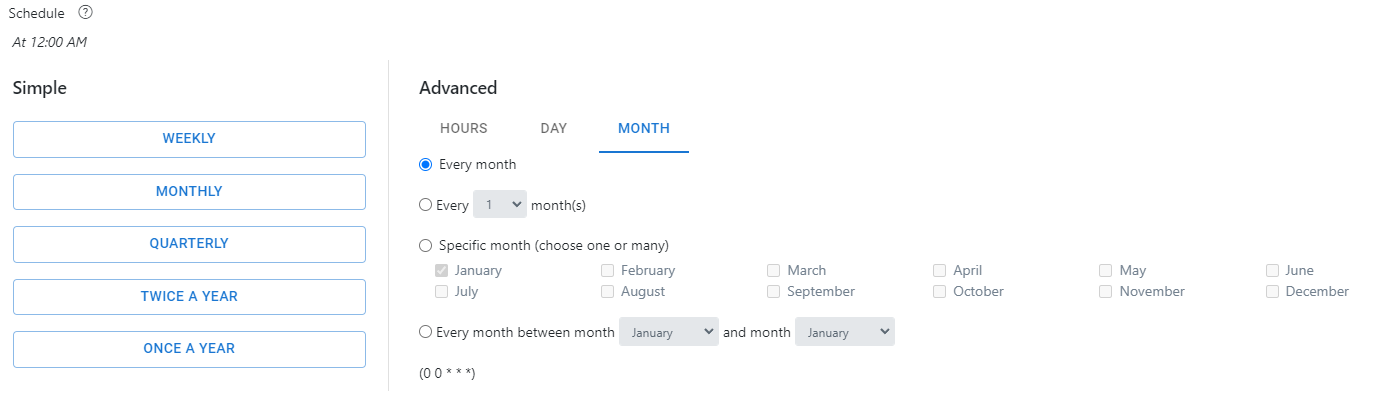
One can use the ‘Scheduled Trigger’ type to have an automation run at a set time and date. The conditions included with the ‘Schedule Trigger’ type are the ‘Simple’ and the ‘Advanced’ settings. The ‘Simple’ settings allow users to select whether they want their automation to run Weekly, Monthly, Quarterly, Twice A Year, or Once A Year. Furthermore, a user can use the advanced settings to build a custom schedule instead of the pre-selected schedule included in the ‘Simple' settings for the automation. One can alter the months, the days, and the hours.
Created / Updated Resource Conditions
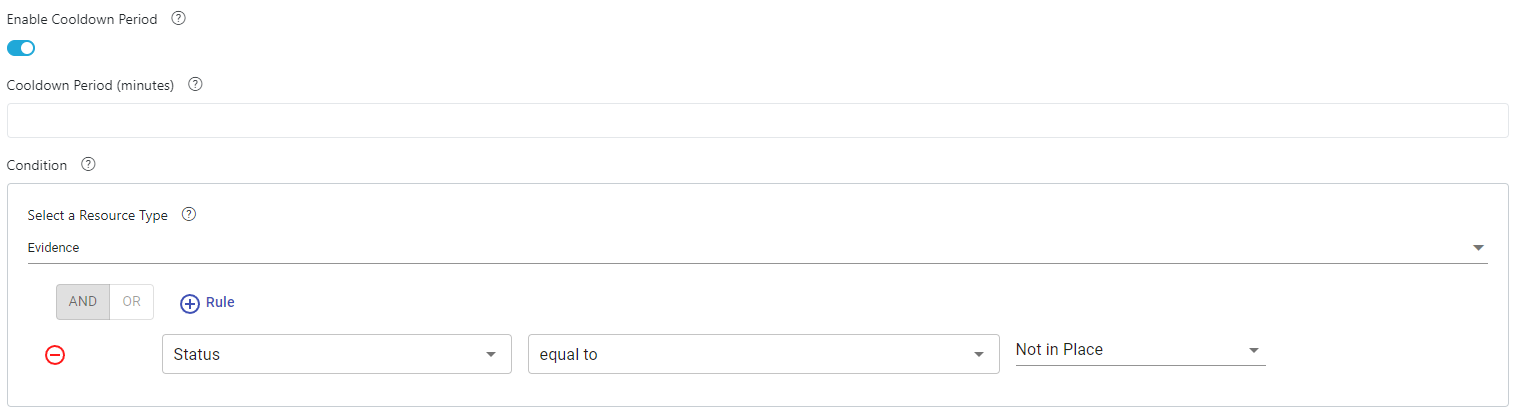
The ‘Created/Scheduled Resource’ trigger type is designed to run if a specified resource is created or updated. Users can set different rules for this trigger type. Users may select the resource type that the automation will check for, as well as rules that apply to the specified resource type. The rules may be any type of custom field included with that resource. Users may also create a ‘Cooldown Period’ for the automation. Essentially prohibiting the automation from running again until the cooldown period has been met. The cooldown period is measured in minutes.