Automation Smart Values
Smart Values allow you to pass data dynamically between different parts of an Automation
Smart Values represent a dynamic piece of data that will be filled in at the time an Automation runs.
Notation
A smart value is a one or multiple dot separated words included in double curly braces. For example: {{webhookData.threatID}} could reference a piece of information passed during a Webhook call.
Smart Value Glossary
{{ webhookData.[field] }} - access any piece of data that was passed in during the Webhook trigger call
{{ item.[field] }} - access a root field from the Resource that triggered an Automation.
{{ steps.http.result }} - the resulting data from an HTTP web request step
{{ steps.http.statusCode }} - the HTTP status code from an HTTP step request
{{ steps.createResource.[field] }}- access a root field from the Resource that was created or updated from a previous step
{{ loop.currentItem }} - the current item being processed during a loop. If this item has nested data, access using more dot notation like: {{ loop.currentItem.name }}
{{ loop.nextItem }} - the next item that will be processed during a loop.
{{ loop.previousItem }} - the previous item that has already been processed during a loop
{{ loop.index }} - a number representing the current position in a loop.
{{ loop.length }} - a number representing the number of items in a loop
{{ steps.customQuery.result.ResourceName.items }} - a list of the resulting items from a custom query. May be passed into a loop automation step
{{ steps.customQuery.result.ResourceName.TopLevelFunction }} - a Top Level Function configured in a custom query. May be used to fill in data such as Metrics or other Smart Values
Smart Value Examples
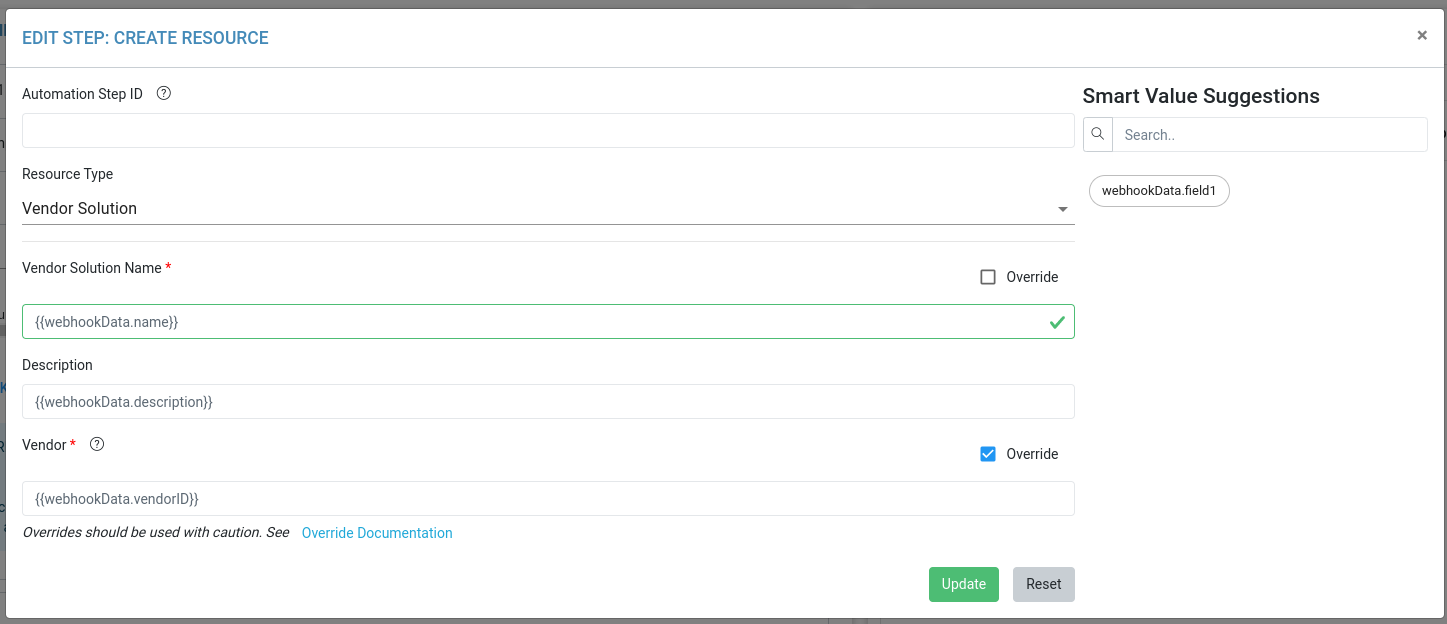
Using Webhook Trigger data to create a Resource
Create an Automation with a Webhook Trigger
Add a “Create Resource” step
Use Smart value notation such as
{{webhookData.name}}to fill in the fields for a new resource